Qwen2.5-Coder 7B InstructBest fit
qwen2.5-coder:7b-instructCodeText32K context
Local-first AI development
APZX IDE turns intent into working software with real repository tools, model freedom, local intelligence, and verification built into the loop.
 APZX IDE
Choose the level of agency each task needs. APZX keeps repository context, model selection, activity, and evidence together.
Inspect the project, edit focused files, run bounded commands, and keep the evidence attached to the task.
Read the request and only the context needed.
Make focused changes inside the trusted project.
Run the checks the repository actually provides.
Return changed files, results, and limitations.
Every provider profile keeps its own endpoint, encrypted credential, discovered models, fallbacks, enabled state, and health. APZX only presents models returned by the provider or deliberately configured for a custom gateway.
Open the provider guide → APIMaster.aiSponsored OpenAI-compatible gatewayDiscover
 OpenAICloud provider setupDiscover
 Google GeminiCloud provider setupDiscover
 OpenRouterMulti-model gateway setupDiscover
 Ollama LocalModels reported by your runtimeDetect
APIMaster.ai supports APZX IDE and offers an OpenAI-compatible gateway. Create an account, get an API key, then connect it in APZX Provider Manager. APZX discovers the models your account actually exposes and never marks the provider ready before a successful check.
Account access, model availability, quotas, pricing, and service terms are managed by APIMaster.ai.
Search recommendations by task, compare capability and size, and keep runtime-reported installation state separate from what is simply available to download.
Local Models / DownloadsOllama is the source of installed and loaded stateAspect ratio preservedAttach screenshots, interfaces, diagrams, and supported images. Preview locally, open a focused viewer, copy the image, and move between fit, natural size, and precise zoom levels.
Explore image inspection →Security is part of the product architecture: isolated UI, narrow privileged bridges, validated operations, and hardened releases.
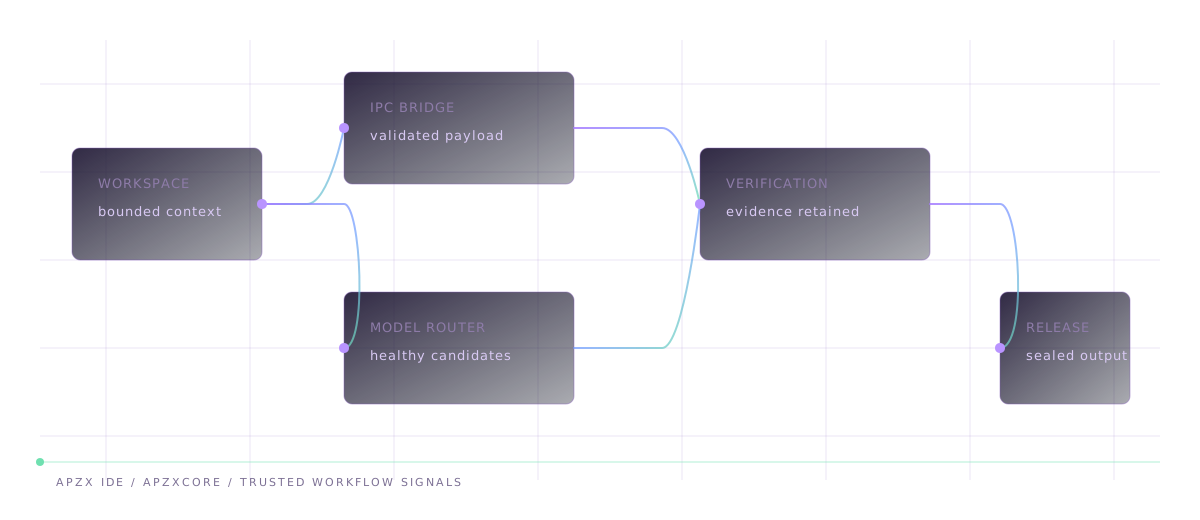
Each stage keeps its own evidence boundary, so a finished task can be inspected instead of trusted as a black box.
Context isolation stays enabled and Node integration stays disabled in the interface.
Typed payload checks keep privileged file, model, and system operations in Electron main.
Provider secrets use operating-system encryption and stay out of projects and diagnostics.
ASAR packaging, integrity validation, security fuses, notices, and checksums ship together.
APZX IDE runs on Windows without a dedicated GPU. Local model speed and capacity depend on the model, quantization, context, available memory, and the Ollama runtime.
Cloud-provider work and lighter local models. Keep other memory-heavy applications limited during local inference.
Recommended headroom for the 7B coding model shown in the APZX catalog and typical repository work.
Better suited to larger contexts, heavier local models, or concurrent development tools.
Useful VRAM depends on the chosen model, quantization, context size, and how Ollama places the workload. CPU execution remains available when supported by the runtime.
Model download sizes are estimates. Reserve space for the application, models, temporary data, projects, and future updates.
Choose the guided Windows installer or the standalone portable executable. Both are current APZX IDE 0.1.0 builds generated from the same verified desktop source.
Version 0.1.0 / Windows x64Choose an installation directory and create branded desktop and Start menu shortcuts through the guided installer.
Download installerLaunch APZX IDE directly from one executable. Settings and protected credentials still use your Windows user profile.
Download portable